Showing posts with label j2ee. Show all posts

Tuesday, May 28, 2013

Monitor exceptions using logstash


To monitor exceptions, we are going to need a little more than grep. Replace the filter section of the test.conf file attached in the previous post with this.

filter { 

 multiline {
                patterns_dir => "D:/logstash/logstash-1.1.9-monolithic/patterns"
                pattern => "^(%{MONTH}|%{YEAR}-)"
                negate => true
                what => "previous"
                type => "loglevel"
        }

 grok {
                patterns_dir => "D:/logstash/logstash-1.1.9-monolithic/patterns"
                pattern => ["(?m)(?<logdate>%{MONTH} %{MONTHDAY}, %{YEAR} %{DATA} [AP]{1}M{1}) %{NOTSPACE:package} %{WORD:method}.*%{LOGLEVEL:loglevel}: %{GREEDYDATA:msg}"]
                singles => true
                
        }
 
 grep {
               # Answers the question - what are you looking for? 
               # In this example, I am interested in server start up. 
               # @message - maps to one log statement/event and I have defined a grep to match the word 
               # 'Server startup' in the message.
               match => ["@message","CannotLoadBeanClassException"]               
               type => "loglevel"
         }
}


Grep matches a word in a line (CannotLoadBeanClassException) but we need a bit more when it comes to getting the exception stack trace, isn't it?
Fret not. Logstash's multiline to the rescue. Multiline uses Grok pattern to identify a pattern.

More about Grok filters >> Here

My tomcat logs are in this format:

May 28, 2013 6:04:30 PM org.apache.catalina.core.StandardContext startInternal
SEVERE: Error listenerStart

pattern => "^(%{MONTH}|%{YEAR}-)" indicates that any line that begins in this format is a part of the multi line event. So, technically, every line in our log file is a part of the multi line event.
negate => true
When negate is set to true the lines which doesn't match (line 101-119) the given pattern will be constituted as a part of the multi line filter and will subsequently be added to the previously encountered line which matches the pattern.(line 100) Phew.! ;-)

For instance at line no. 100 we have a match and assume that the subsequent lines give away the stack trace.
Line 100:: May 28, 2013 6:04:30 PM org.apache.catalina.core.StandardContext startInternal
.................
.................
/* A match is occurred at line 100 and the subsequent 20 lines are added to line 100. */
....................
....................
Line 120::: May 28, 2013 6:04:30 PM org.apache.catalina.core.StandardContext stop

This way, we will get the entire stack trace.


Now that we have the stack trace  with us, its just a matter of configuring the appropriate output. 
 Send the message via Email or Invoke a HTTP endpoint

As Sridhar pointed out, there should be an option for the users to subscribe for a specific exception rather being spammed with all exception stack traces.


# Define grep blocks for the exceptions that you want to monitor and as
# when there is a match you can add certain feilds and use them later

grep {
               match => ["@message","NullPointerException"]
               add_field => ["exception_message", "Exception message - %{@message}"]            
        add_field => ["exception_subject","NullpointerException occurred"]
               add_field => ["recipients_email","johnDoe@gmail.com"]
        type => "loglevel"
     }
  
grep {
        match => ["@message","IndexOutOfBoundsException"]
        add_field => ["exception_message", "Exception message - %{@message}"]            
        add_field => ["exception_subject","IndexOutOfBoundsException occurred...."]
        add_field => ["recipients_email","janeDoe@gmail.com"]
        type => "loglevel"
}

# This way, you can customize the message sent for each exception.
# again, recipients, subject and message are json attributes.
# Url points to the http end point which takes care of sending out mails. 
 http {
    content_type => "application/json"       
    format => "json"    
    http_method => "post"
    url => "http://localhost:8080/services/notification/email"
    mapping => ["recipients","%{recipients_email}","subject","%{exception_subject}","message","%{exception_message}"]      
    type => "loglevel"
  }

And if there are n-number of exceptions that you need to monitor you can define them in separate conf files  and provide the folder as input during logstash start up using logstash's command line flags. That way, it ll be easier to maintain the conf files. One file for every exception might be an overkill but how about one conf file per module?

Makes sense? B-)

Do let me know if you try this out.

Happy Coding :)
~ cheers.!

Logstash - Getting started

Remember this?

Problem statment for starters :
Consider this scenario. Any enterprise application these days comprises of one to few moving components. Moving components as in, components that are hosted on separate servers. A simple J2EE application which does basic CRUD operation via an User Interface has 2 components.
  1. Server 1 - To hold the business logic and UI
  2. Server 2 - Database server.
Now, ideally, as a developer I would be interested if there is a problem with either one of the components. I would like to be notified if there is a problem. This problem has two parts to it. 
1. To parse the Log messages.
2. Notify concerned parties.

1. To parse the Log messages. 
About Logstash from the description (in their own words)
Logstash is a tool for managing events and logs. You can use it to collect logs, parse them, and store them for later use(like searching)
It is fully and freely open source. Comes with Apache 2.0 license.
Logstash's configuration consists of three parts
Inputs – Where to look for logs? Log source.
Filters – What are we looking for in the given logs? Say, a particular exception or a message
Outputs – What to do once I find the exception/message? Should I index it, should I do something else? Then go ahead and configure it up front.

Logstash requires these things to be configured in a *.conf file. And this file needs to be passed during start up. 
Sample test.conf file

input 
{
 file {
  # Answers the question - Where? Logstash will look for files with the pattern catalina.*.log
  # sincedb is a file which logstash uses to keep track of the log lines that has been
  # processed so far. 
  type => "loglevel"
                path => "D:/Karthick/Softwares/Tomcat/tomcat-7_2_3030/logs/catalina.*.log"  
  sincedb_path => "D:/logstash/sincedb"
  }
}
filter { 

 grep {
               # Answers the question - what are you looking for? 
        # In this example, I am interested in server start up. 
        # @message - maps to one log statement/event and I have defined a grep to match the word 
        # 'Server startup' in the message.
        match => ["@message","Server startup"]               
        type => "loglevel"
         }
}
output 
{
  stdout
  {
 # Answers the question - what to do if there is match? 
 # For now, we'll just output it to the console. 
  message=>"Grep'd message  - %{@message}"
  }
}

Steps:
- Download logstash jar from this location .
- Place the jar inside a working directory (D:/logstash in my case) and extract it.
- Copy the test.conf inside working directory (D:/logstash)
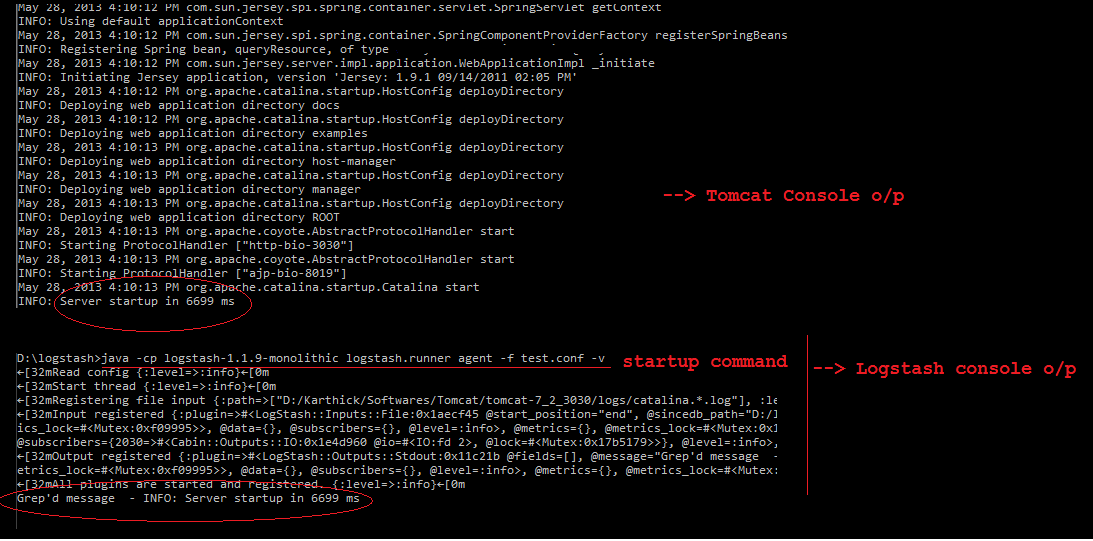
- Open command prompt and navigate to the working directory and run this command.

java -cp logstash-1.1.9-monolithic logstash.runner agent -f test.conf -v

Start local tomcat (since I've used Tomcat logs as my source)

Once logstash is done parsing the log file, you'll see the output in the logstash console.


Next post : Monitor exceptions using logstash

Happy Coding :)
~ cheers.!

Wednesday, May 1, 2013

Factory pattern in Spring


Recently, I was working on a requirement to send notifications via email and sms in my project. My initial design was to have a common interface (NotificationService) with these methods - sendNotification and validateRequest. Both the SmsNotifier and EmailNotifier would implement the interface NotificationService and access to the notification interface would be through a rest end point (post).


And since I’d auto wired dependencies in the Resource class, I’d to figure out a way to inject implementations dynamically. So, I opted for a factory pattern design. This is a straight forward requirement but let’s see how to achieve this with spring.

package com.spring.prototype.service;

public interface NotificationService {
 String sendNotification();
}

@Component("email")
public class EmailNotificationService implements NotificationService {

 public String sendNotification() {
  return "Send notifications via email";
 }

}

package com.spring.prototype.service;

import org.springframework.stereotype.Component;

@Component("sms")
public class SmsNotificationService implements NotificationService {

 public String sendNotification() {
  return "Send notifications via sms";
 }

}

Solution: ServiceLocatorFactoryBean which takes two inputs
serviceLocatorInterface – which is responsible for creating classes based on the input
mappings – which maps names to actual implementations.

Add these configurations in the context xml.
Autowire factory class instead of the interface and let the input decide which implementation to choose.

<beans:bean
  class="org.springframework.beans.factory.config.ServiceLocatorFactoryBean"
  id="printStrategyFactory">
  <beans:property name="serviceLocatorInterface"
   value="com.spring.prototype.factory.NotificationFactory">
  </beans:property>
  <beans:property name="serviceMappings">
   <beans:props>
    <beans:prop key="email">email</beans:prop>
    <beans:prop key="sms">sms</beans:prop>
   </beans:props></beans:property>
</beans:bean>


Resource Class:
------------------

@Component
@Path("/notification")
@Produces(MediaType.TEXT_PLAIN)
public class NotificationResource {

 @Autowired
 NotificationFactory factory;

 @POST
 @Path("{type}")
 public String sendNotification(@PathParam("type") String type) {
  return factory.getNotificationService(type).sendNotification();
 }

}

Full project is available on github.

Note: You would actually end up writing a lot more code to send mail/sms. This post deals only with implementing a factory pattern in Spring and autowiring dependencies. Let me know what you think.
 
Happy coding :)

~ cheers.!